Permit to Work
Put a controlled job in writing: what is being done, what has to be true before it starts, who is covered and when it was handed back.
SI-01 2 pages
Everything here is free. Making it takes time and money. Everything here is free.
 Buy us a coffee
 Access and visitor control · AS-10
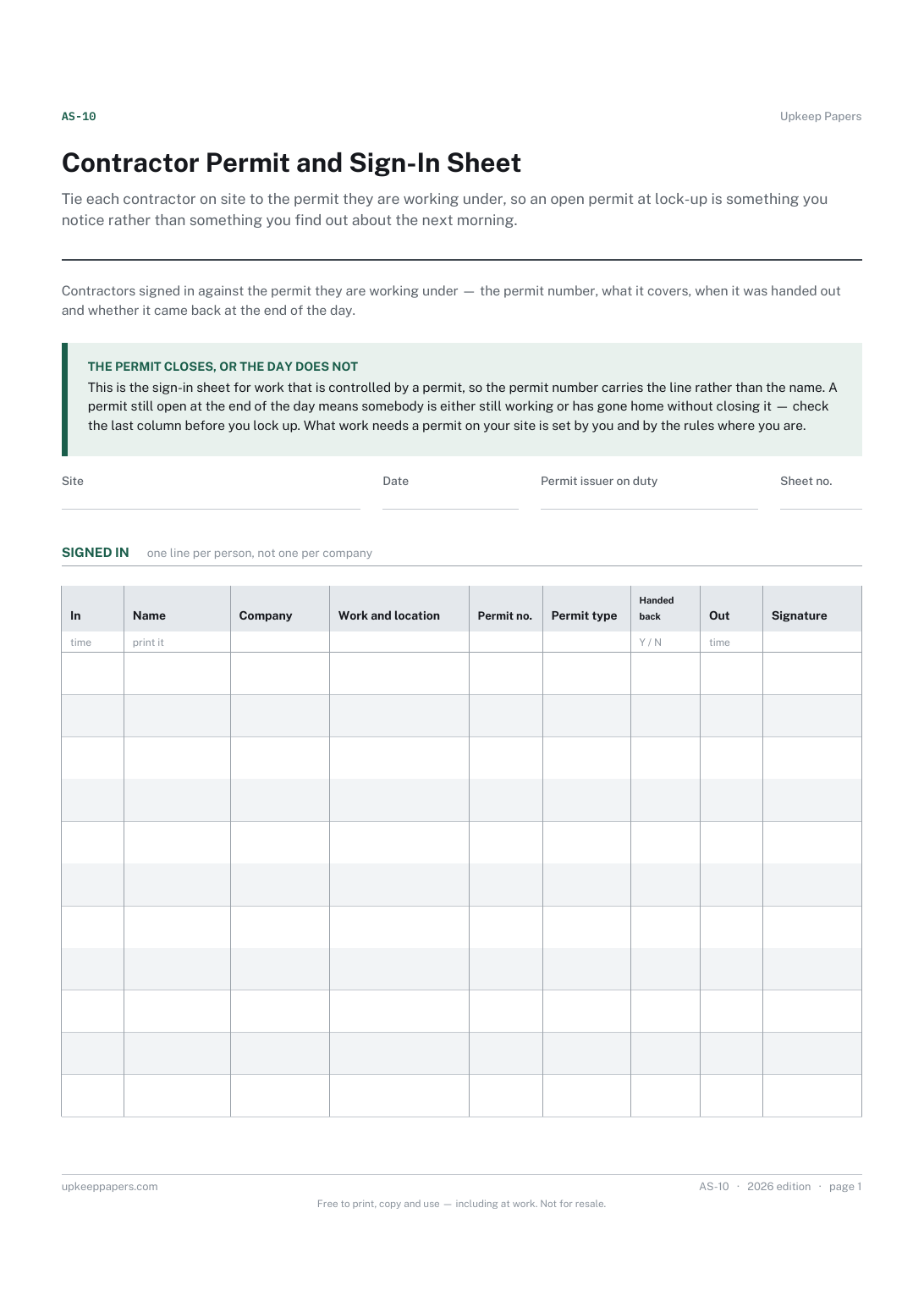
A contractor sign-in sheet built around the permit — name, company, work, location, permit number and type, and whether it was handed back.
One page. Choose your paper size — both versions are laid out identically, so neither one gets shrunk to fit.
Print it and write on it
Fill it in type and save
The fillable versions have real form fields — open them in any PDF reader, type into them and save. Printing help.
Tie each contractor on site to the permit they are working under, so an open permit at lock-up is something you notice rather than something you find out about the next morning.
Site managers, facilities teams, maintenance supervisors and anyone who issues permits to contractors working on their premises.
One page, top to bottom:
Printed under the title: Contractors signed in against the permit they are working under — the permit number, what it covers, when it was handed out and whether it came back at the end of the day.
The permit closes, or the day does not. This is the sign-in sheet for work that is controlled by a permit, so the permit number carries the line rather than the name. A permit still open at the end of the day means somebody is either still working or has gone home without closing it — check the last column before you lock up. What work needs a permit on your site is set by you and by the rules where you are.
Write-on lines: Site · Date · Permit issuer on duty · Sheet no.
Table, 11 rows: In · Name · Company · Work and location · Permit no. · Permit type · Handed back · Out · Signature
That sheet records what a contractor was told when they arrived. This one records what they were authorised to do while they were here. A site that issues permits usually wants both, and they are easier to read as two sheets than as one very wide one.
That is set by your own site rules and by the rules where you are, and it varies with the work, the building and the trade. This sheet does not say — it records the permits you decided to issue.
Put a controlled job in writing: what is being done, what has to be true before it starts, who is covered and when it was handed back.
Record not just that a contractor arrived but what they were told about your building before they started work.
Control work that makes heat, flame or sparks, and record the after-check that catches the fire that starts once everyone has gone home.
Account for the vehicles and drivers that come onto a site without ever reaching reception, and know which of them is still inside the fence.

Every sheet, binder, game and puzzle on Upkeep Papers is free to download, with no email and no account. Making them is not free: each one takes days of research, design and checking, and the site costs money to run. If something here saved you time, you can buy us a coffee. It is entirely optional: nothing is locked, and nothing changes if you don’t.
Buy us a coffee Opens PayPal in a new tab. Any amount, and nothing changes if you would rather not.